The examples demonstrate property identification and appraiser-label reading in Sarasota and Manatee counties, plus one Sarasota Tax Collector Account Summary and Account History lookup. Manatee tax, permit, recorded-document and flood links remain starting points, not completed example searches.
01 / Find the right record
Start with the property match
- Gather the full street address, including N/S/E/W and any unit, plus a parcel or account number if you have one.
- Open the Sarasota County Property Appraiser search or Manatee County Property Appraiser search. If the county is uncertain within this two-county area, compare both official searches. Postal city alone does not decide which county to search. A zero result alone does not settle the county either.
- In Manatee, make sure Property Type reads REAL PROPERTY. A tangible-personal-property account is not a substitute for the land/building record.
- Compare the returned full address and real-property identifier with your subject. Keep directional prefixes, units and possible alternative matches visible. If the match remains ambiguous, stop and clarify it.
- Record the parcel/account number, situs and municipality or jurisdiction as printed. Use that classification to choose a planning-office starting point, then confirm the relevant authority with that office.
Sarasota example: an address you can reproduce
At the official Sarasota appraiser search, search 2024 PRINCETON ST. The recorded browser check reached account 2023130070, with municipality City of Sarasota. Match the account and address before copying a field.
The card's value headings included Just, Assessed, Exemptions, Taxable and Cap. A zoning field on the appraiser card remains an appraiser attribute. The City of Sarasota map check located Princeton Street but did not read its zoning district; this guide supplies no independently checked city-district result.
Follow the Princeton record
Read the Sarasota Tax Collector account
Once you have matched the Princeton appraiser record, use the same example to find the collector’s Account Summary and Account History. Confirm the property again before reading payment-status fields.
Checked in Chrome on . Payment status can change. This example stops at the on-screen summary and history; no individual bill PDF was opened.
1. Start at the official collector page
- Open the Sarasota Tax Collector Property Tax Overview and follow View/Pay Taxes. It may open a new tab.
- A site security check may appear. Complete it if you can; if access remains blocked, stop and return later or contact the collector. A challenge alone does not mean the site is down.
- Wait for the payments hub’s service tiles to load, then choose Property Tax.
- In the search field labeled Name, Address, Account Number, etc., enter 2023130070. Choose the suggestion labeled Account 2023130070.
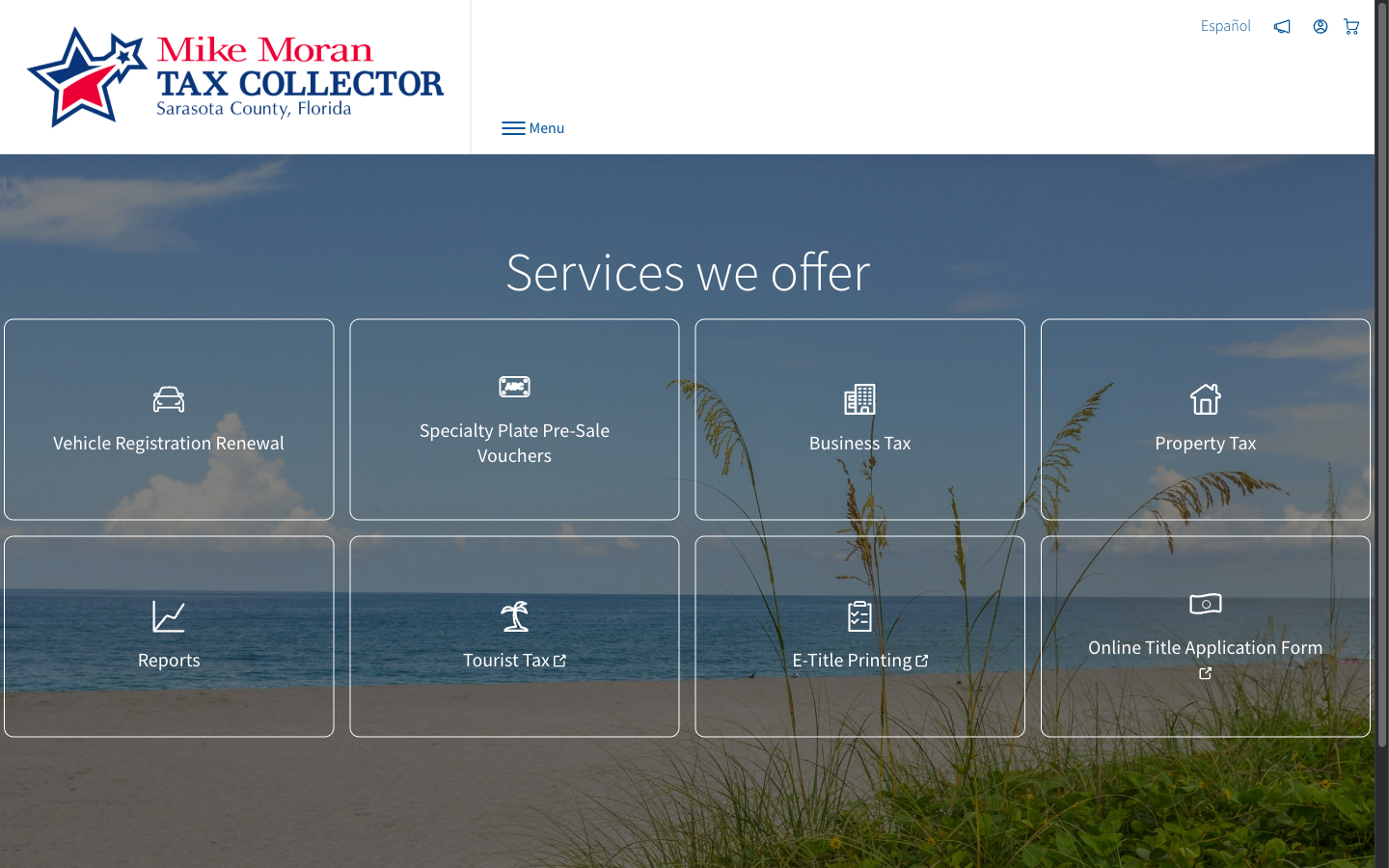
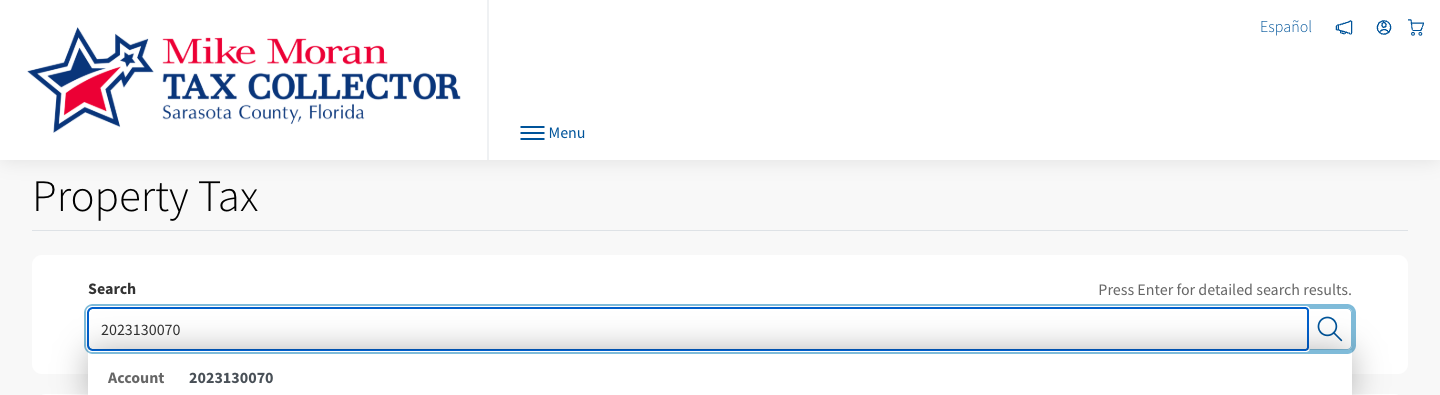
2. Match the account number and situs
The Account Summary must show Real Estate Account #2023130070 and Situs: 2024 PRINCETON ST. If either differs, stop and resolve the match. A suggestion with matching digits is not enough.

Watch the house number. In a recorded check on 19 September 2026, searching this street address offered nearby house numbers instead. That was one observation, not a promise about every search. For this example, search the account number and then confirm the exact situs.
3. Wait for the fields, then read their labels
The account heading can appear while Amount Due and Account History still say Loading. Wait for those sections to finish. A blank or loading panel does not mean nothing is due. If they remain unavailable, retry from the official overview; do not rely on a bookmarked session URL.
| Printed label | What this check showed | How to use it |
|---|---|---|
| Amount Due | On 19 September 2026 UTC, the collector displayed “paid in full” and stated that nothing was due at that time. | A dated collector status. Recheck when you need it; this is not a closing payoff or a title conclusion. |
| Account History → BILL | 2025 Annual Bill, 2024 Annual Bill and 2023 Annual Bill. | Preserve the collector’s bill-year labels. They do not establish whether an appraiser roll is certified. |
| STATUS | Paid, with a date and receipt number. Receipt numbers are omitted here. | Copy the status and relevant date as printed. Consult an official definition before interpreting an unfamiliar status. |
| Certified Roll Owner | A heading on the collector summary; the owner name is omitted. | Do not infer an appraiser year’s certified or preliminary status from this heading. |
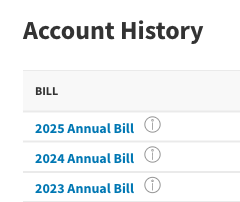
Keep collector payment labels separate from the appraiser’s Just, Assessed and Taxable values. This walkthrough does not establish planning jurisdiction, a sale price, a payoff or title. PDF, email and payment controls are outside this example.
Illustrations are cropped from the 19 September 2026 check. Select an image to view it at full size. Labels and portal layout may change.
When the direction changes the property
Searching 4900 TAMIAMI TRL without a direction returned two different properties in the recorded Sarasota check:
| Full situs | Appraiser account | Municipality as printed |
|---|---|---|
| 4900 S TAMIAMI TRL | 0077160028 | Sarasota County |
| 4900 N TAMIAMI TRL | 2001100012 | City of Sarasota |
Ask for the missing direction, ZIP or account number. This is an incomplete-address collision, not evidence that one property has two parcels. Use the official search and account numbers to reproduce it.
02 / Read it accurately
Keep the source's labels and dates
Copy Just or Just/Market Value, Assessed and Taxable under their original headings. Florida's Department of Revenue uses just (market) value in the property-tax assessment context. An assessment valuation is not a recorded transaction price or a guarantee of today's sale price. Keep it separate from a sale comparable or title conclusion. See the Florida taxpayer assessment explanation and Sarasota appraiser glossary.
Record the year on the row and any printed status note. Do not infer certified or preliminary status from the year alone. Keep the date you viewed the page separate from the record's stated effective date; if an effective date is missing, write “not stated.” A recorded sale entry on an appraiser card is also different from a deed you have retrieved and read.
03 / A worked example
Worked example: a Sarasota postal address in a Manatee record
Start at the Manatee appraiser search, check REAL PROPERTY, and search 1302 ROME AVE or 6656500003. The recorded browser checks reached the same parcel card.
| Reading | What was displayed | What you can conclude |
|---|---|---|
| Parcel ID | 6656500003 | This identifies the returned real-property card; compare it with your subject. |
| Situs | 1302 ROME AVE, SARASOTA, FL 34243-5028 | SARASOTA appears in the postal address. |
| Jurisdiction | UNINCORPORATED MANATEE COUNTY | This is the appraiser's classification. Start with Manatee County planning and confirm the authority relevant to your question. |
| Value headings | Just/Market Value; Non-School Assessed Value; School Assessed Value; County Taxable Value; School Taxable Value; Municipality Taxable Value | These are separately labeled categories. No dollar amounts are reproduced here. |
| Year rows | 2025 and 2026 were visible | A printed status note and effective date were not recorded in the research evidence. Neither year is described here as certified or preliminary. |
The card and the separate ID/address searches were checked in Chrome on September 19, 2026 UTC. The useful finding is the combination of postal address, parcel identifier and printed appraiser classification. It does not establish a planning determination, proposed-use permission, tax bill, retrieved deed or flood conclusion.
For a separate Sarasota tax example, follow the Princeton collector walkthrough. It does not extend the Manatee record findings above.
For how often these traps occur across a whole county, field study No. 01 counts them in the Sarasota County certified roll: the jurisdiction split behind a Sarasota address, directional address collisions, sales qualification and the distance between just and assessed value. It reports counts and their source file, not determinations.
Take the full address and identifier to the county planning office with your specific question. A separate county GIS check selected the parcel and displayed attributes; those attributes are not a zoning approval.
04 / Official starting points
Choose the next source
Use the source directory below to select an office by question: planning/zoning, taxes, permits, recorded documents or flood maps. Confirm jurisdiction with the relevant office. The directory covers the named county and city entries; it does not provide a tested route for every municipality in either county.
For Sarasota tax, the Princeton walkthrough records a completed Account Summary and Account History lookup on 19 September 2026 UTC. Account and situs were matched before the loaded fields were read. Payment status is dated; no individual bill PDF was opened. Security checks and loading delays can occur.
Dates below are UTC and belong to the recorded check, not this page’s assembly. “Page opened” means the entry loaded; “form reached” does not mean a record was retrieved. “Locate only” means a map point was found without reading district attributes. “Lookup completed” describes only the specified record read. For the Sarasota collector example, this means the account and situs matched and Amount Due and Account History finished loading; it does not mean a bill PDF was retrieved.
Match a Sarasota parcel
Sarasota Property Appraiser
Chrome: lookup completed
Princeton card and Tamiami results checked. Copy municipality as printed.
Checked · UTC
Match a Manatee parcel
Manatee Property Appraiser
Chrome: lookup completed
Rome card checked. Confirm REAL PROPERTY and compare full situs/ID.
Checked · UTC
Understand Sarasota labels
Sarasota PA glossary
HTML: page opened
Terminology reference; the card itself prints Just.
Checked · UTC
Understand assessment categories
Florida Department of Revenue
HTML: page opened
State assessment explanation, not a local bill or sale price.
Checked · UTC
Sarasota tax entry
Sarasota Tax Collector
Chrome: page opened
Follow View/Pay Taxes (which may open a new tab), wait for the hub tiles, then choose Property Tax. A site security check may appear.
Checked · UTC
Sarasota tax account search
Sarasota tax Account Summary
Chrome: lookup completed
Start at View/Pay Taxes, then choose Property Tax. Princeton account and situs matched; Amount Due and Account History loaded. Dated payment status, not a bill PDF.
Checked · UTC
Manatee tax account search
Manatee Tax Collector
Chrome: lookup completed
Accept the terms of agreement first — it gates every fresh session. Property Id search on 6656500003 returned 28 rows, one per tax year, with status, amount paid and date paid.
Checked · UTC
City of Sarasota planning/zoning
City zoning program
Chrome: page opened
Official pointer to city maps; not a parcel determination.
Checked · UTC
City of Sarasota zoning map
Zoning and Future Land Use App
Chrome: locate only
Princeton address located; district not read.
Checked · UTC
Unincorporated Sarasota zoning
County zoning program
Page fetch: page opened
Parcel-on-map identification not completed.
Checked · UTC
Manatee county GIS attributes
Land Development map
Chrome: parcel lookup completed
Rome parcel selected; GIS attributes are not zoning approval. City Boundaries layer was not read.
Checked · UTC
Manatee land-development scope
County LDC / Comprehensive Plan
Page fetch/Chrome: page opened
Unincorporated-area scope context, not a parcel determination.
Checked · UTC
City of Bradenton planning map
Land Development map
HTML: viewer entry opened
Parcel overlay not checked.
Checked · UTC
Sarasota County permits
County Building portal
HTML: page opened
Search not submitted; reCAPTCHA present in the checked entry.
Checked · UTC
City of Sarasota permits
City FTG permit search
HTML: page/form visible
No example search submitted.
Checked · UTC
Manatee County permits
County Accela
HTML: page opened
No example permit search completed.
Checked · UTC
City of Bradenton permits
City Accela
HTML: page opened
No example permit search completed.
Checked · UTC
Sarasota recorded documents
Sarasota Official Records
HTML: page opened
No example document search or deed retrieval completed.
Checked · UTC
Manatee recorded documents
Manatee Official Records
HTML: page opened
No example document search or deed retrieval completed.
Checked · UTC
Flood-map starting point
FEMA Flood Map Service Center
Page fetch: page opened
No example address search completed; not an insurance determination.
Checked · UTC
05 / Keep your findings
Keep a short record of your findings
Use the blank worksheet below in your own notes. Record the match, source labels, dates, supported finding and next unanswered question. Nothing needs to be entered or uploaded to this website.
Blank worksheet
Keep a copy in your own notesCompare the full address and real-property identifier first. Check REAL PROPERTY in Manatee. Stop if a direction, unit or match remains unresolved.
- Full street address, direction and unit
- Question to answer
- County / municipality, or still uncertain
- Property appraiser and real-property identifier
- Match checked against
- Other possible matches / missing details
- Original field label and what the record says
- Office and page / record locator
- Printed year and any status note
- Stated effective date (or not stated)
- Date viewed
- Finding I can support, with its source
- Question still open / next source and action
- My interpretation, separate from source facts
Copy the source’s labels, year and any printed status note. Do not infer an effective date or certified/preliminary status. Repeat the record fields for each finding.
The checks you can take to another property
Before repeating a property fact, match the full address and real-property identifier to the record. Keep each finding under the label and year printed by its source, and copy any printed status note. Record when you viewed the page separately from the record’s stated effective date; leave that date ‘not stated’ if it is missing. Say what the record does not establish, then choose the next source or office that can answer the open question. These questions transfer; local definitions, identifiers and portal steps may not.
Optional product path
Optional: where Glove fits
Doing this kind of records work regularly? Glove gathers available records through a supported AI tool. Check the coverage for your property and see the existing public sample before deciding whether it fits your task. Supported clients are Claude Code, Cursor and Codex; connection setup is required. The worksheet remains useful without Glove.
Use it & cite it
Link to this guide
Free to use and to share. If it saved you a lookup, a link back keeps it maintained.
Cite it
Klebl, C. (2026). Sarasota & Manatee CRE property records: a first-look guide. Sterling Digital Partners. Retrieved from https://glvtl.com/cre-property-records/Link to it
<a href="https://glvtl.com/cre-property-records/">Sarasota & Manatee CRE property records: a first-look guide</a>, Chris Klebl, Sterling Digital Partners, 2026.06 / Evidence & upkeep
About the checks and corrections
The examples draw on recorded automated Chrome checks of public sources, plus earlier entry-page checks. They are not novice-user testing or a study of product accuracy or time savings. A loaded page, visible search form, located map point, completed parcel read and loaded collector Account Summary represent different levels of verification; each source entry states its level and date.
The collector walkthrough was completed once, end to end, in a live session. Portal behaviour varies between sessions: a security check, a slow panel or a changed path can all appear. If one blocks you, return later or contact the office. Reaching the same record is not guaranteed from every fresh session.
This is a preliminary record of research, not a survey, valuation, title search or permission for a proposed use. No assessment amounts, collector dollar amounts, receipt numbers or owner names are reproduced in the examples.
Found a changed link, label or instruction? Email Sterling Digital Partners with the guide section and public source URL. Avoid sending private client information. Source dates describe the recorded checks, not a promise that a portal remains unchanged.